
E
Emrah Tezcan
Misafir
Misafir
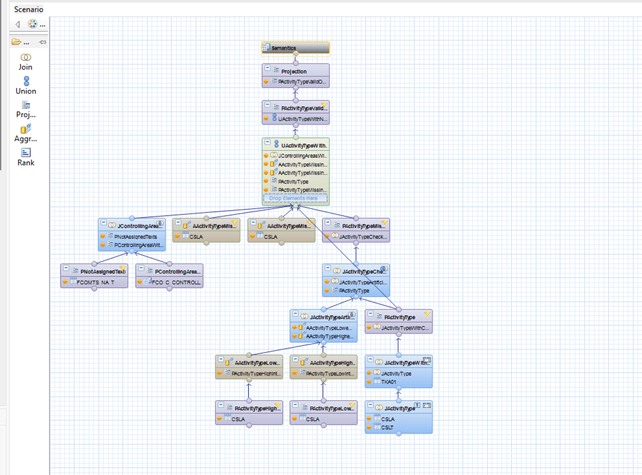
How SAP simplified its modeling approach, what this means for BPC reports, and how to migrate legacy views safely.
Introduction
After upgrading to SAP HANA 2.0, you may notice that all new modeling objects are created as Calculation Views. Existing Attribute Views and Analytic Views are still visible, but no new ones are being developed.
This is not a system error or a configuration issue. It is part of SAP’s long-term strategy to replace multiple information view types with one standard object: the graphical Calculation View.
This article explains why SAP made this change, how it affects existing BPC reporting scenarios, and how legacy views can be migrated safely.
From Three View Types to One
Early SAP HANA releases offered three main information view types:
- Attribute Views for master data and dimensions
- Analytic Views for transactional and star-schema reporting
- Calculation Views for more complex modeling requirements
Over time, SAP added the capabilities of Attribute and Analytic Views to Calculation Views. Features such as star joins, dimension-based models, and improved optimization made Calculation Views capable of handling almost every modeling scenario.
As a result, maintaining three similar view types was no longer necessary.
With SAP HANA 1.0 SPS 11, Attribute Views and Analytic Views were officially deprecated. SAP recommended using graphical Calculation Views for all new developments. Script-based Calculation Views were also deprecated in favor of graphical Calculation Views and table functions.
What Does “Deprecated” Mean?
Deprecated does not mean that the objects stop working immediately.
After upgrading to SAP HANA 2.0, existing Attribute Views and Analytic Views can still be used by reports, Composite Providers, and BPC applications. Therefore, the upgrade does not break existing reporting scenarios unless the legacy Attribute Views and Analytic Views are migrated during the upgrade.
However, these legacy views have important limitations:
- They should not be used for new development.
- They may not be supported as reusable objects in newly created Calculation Views.
- They belong to the older XS Classic and SAP HANA Repository architecture.
SAP Note 2465027 also deprecates XS Classic and the SAP HANA Repository. This means the entire classic modeling approach is being replaced by XS Advanced and HDI-based development.
The strategic direction is clear: new HANA modeling should use graphical Calculation Views.
Migrating Legacy Views
SAP provides a migration tool that converts legacy views into modern objects.
The tool can convert:
- Attribute Views into graphical Calculation Views
- Analytic Views into graphical Calculation Views
- Script-based Calculation Views into table functions used by graphical Calculation Views
For productive systems, especially when BPC reports depend on these views, Copy & Migrate is the safer approach.
Why This Matters for BPC Reporting
In BPC environments, HANA views may be used by reports, Composite Providers, virtual providers, or planning applications.
This is especially important in BPC Embedded scenarios, where Calculation Views can:
- Read data from multiple BW providers
- Apply transformations
- Combine different data sources
- Support planning and reporting logic
- Make intermediate calculation steps easier to analyze
If BPC reports still depend on Attribute Views or Analytic Views, they are also indirectly dependent on a deprecated modeling architecture.
The reports may continue to work today, but a future HANA release may remove support for XS Classic completely. Migrating early allows the change to be planned, tested, and controlled.
Recommended Migration Approach
A safe migration process can follow these steps:
- Identify all Attribute Views and Analytic Views.
- Check which reports, Composite Providers, and BPC objects use them.
- Prioritize views used by critical productive reports.
- Migrate the views in a sandbox/dev system using Copy & Migrate.
- Compare the results of the old and new views.
- Update consumers to use the new Calculation Views.
- Transport the changes and test them again.
- Remove the legacy views only after confirming that they are no longer used.
Important SAP References
The following SAP Notes and documents provide additional guidance:
- SAP Note 2325817 – Migration of Analytic, Attribute, and script-based Calculation Views to graphical Calculation Views
- SAP Note 2465027 – Deprecation of SAP HANA XS Classic and the SAP HANA Repository
- SAP HANA Modeling Guide – Includes guidance for converting Attribute Views and Analytic Views into graphical Calculation Views
Conclusion
After a SAP HANA 2.0 upgrade, seeing only Calculation Views in new developments is expected.
SAP gradually moved the functionality of Attribute Views and Analytic Views into Calculation Views and selected the graphical Calculation View as the standard modeling object.
Existing legacy views may still work, but they belong to a deprecated architecture and should not be used for future development.
The safest approach is to migrate gradually. Use Copy & Migrate, test the old and new views side by side, update BPC and reporting consumers carefully, and remove legacy views only when they are no longer needed.
Frequently Asked Questions (FAQ)
Will my Attribute Views and Analytic Views stop working after upgrading to SAP HANA 2.0?
No. Deprecated views continue to function after the upgrade. Existing reports, Composite Providers, and BPC applications keep using them. The upgrade does not break current reporting scenarios unless you actively migrate the legacy views during the process.
Why did SAP replace three view types with a single Calculation View?
SAP progressively added star joins, dimension-based models, and optimization features to Calculation Views. Once one object could handle nearly every modeling scenario, maintaining three similar view types became unnecessary, so the graphical Calculation View became the standard.
What is the safest way to migrate legacy views in a productive system?
Use the Copy & Migrate approach. Migrate views in a sandbox or development system first, compare old and new results side by side, update the consumers, transport and retest, and remove legacy views only after confirming they are no longer used.
Why does this migration matter specifically for BPC reporting?
In BPC Embedded scenarios, Calculation Views read from multiple BW providers, combine data sources, and support planning logic. If reports still rely on Attribute or Analytic Views, they depend indirectly on the deprecated XS Classic architecture, which a future HANA release may remove entirely.
Bu bağlantıyı görüntüleyebilmek için kayıt olmalı zaten üyeyseniz üye girişi yapmalısınız.